Changes from original design:
coverline ('SHOW TIME - get ready for our production of the Wizard of Oz!') to fill in some space on this front cover.
* I didn't have time to create a document looking like an acceptance letter for the image, like I originally planned, therefore I added the text 'Accepted!' onto the folder instead, to connote that the acceptance letter is inside the folder.
*Originally I planned to take the photo outside the doors of the schools main entrance, however this was not possible, as people kept on needing to get in and out of the school, therefore I could not take an image of just my model there, and decided to take it by the walls of the school.
* I added the 'emboss' and 'drop shadow' effects to the title of my magazine, which was not originally planned.
Procedures:
* I opened a new file on photoshop, making sure an A4 letter was selected.
* I then opened my main image and dragged it onto the new file, then making it fit onto the A4 page without distortion.
* I then added my titile, using a text box, adding the effects 'emboss' and 'drop shadow' to it. I then made sure it was centred on the page.Next I coloured it so that it was the same colour as my models ID badge cord.
* I added the issue date and price, on the top right of the page, just above the titile in 10pt.
* I then wrote my coverlines and sublines, making sure the coverlines were the same colour as the titile. I also made sure that the coverlines and sublines framed the image, and did not go across any of the images face. Moreover, I made sure that the main coverline was the biggest, and that it anchored the image.
* Next I added the puff, using the shape tool, colouring it the same as the title, I added the text on top of it to advertise the competition.
* Finally, I added the bar code to the magazine, in the bottom right corner.
FINAL CONTENTS PAGE (Created with Quark Xpress)
Changes from original design:
* I only had two images on my contents page instead of the originally planned three, for two reasons; 1) They couldn't fit on the page with all the feature and regular content, 2) I could not get a picture of the school theatre at the time I took my pictures as it was in use.
* One extra feature article has been added, as with the front cover.
* I could not fit in the 'Help Page' and 'Funny Times' articles in the regular content, as there was no room for them.
* I added a 'drop shadow' effect to the title, which I did not originally plan to add.
* I cut my page into 3 columns instead of the original plan of 2.
* I did not add a 'subscribe' section on the bottom left of the page as originally planned, as there was no room for it.
* I did, however, add the 'Win a free memory stick' part, which related to the 'puff' on the front cover, also with a page reference so that readers can find the page on which the contest information is on.
Procedures -
* I opened a new project on Quark Xpress, and changed the number of columns from 1 to 3.
* I then added another page, along with the master page, to the project.
* Next, I wrote the title 'Contents' and made sure it spread across two columns.
* I then added my text, feature articles, and then regular content, by drawing a text box in columns 1 and 2.
* I changed the colour of my title and coverlines to the same purple as is on the front cover to connect the two.
* I added the drop shadow effect to the work 'Contents'.
* I then drew one picture box onto the 2nd and 3rd column, and a second onto just the 3rd column, then importing my two pictures into them, and making it so that the would fit in the boxes without distortion.
* I then added small texts boxes onto the bottom right hand corners of the pictures, and added a page reference number to them.
* I then added a final text box onto the bottom left of the page, in the third column to add a reference to the competition puff on the front cover.
Monday, 11 October 2010
Photoshop Screenshots
Manipulated, final image for front cover, put into an A4 photoshop file, with no title, coverlines, barcode etc.
Title has been added.
Coverlines and sublines have been added.
Title has been added.
Bar code and puff has been added, front cover is finished.
Manipulated Images
Links to the main coverline ('HIGH FLYER - Year 13 student accepted into Cambridge). It is taken by one of the walls of the school, and the subject is wearing a sixth form ID badge - this is to represent the school, so that it is apparent which school the magazine belongs to.Manipulation - I edited the contrast and brightness of this image to give it a clearer, more radiant look. I also edited the colours, so that the picture looks warmer, and in a way 'happier' - relates to coverline, as student is happy she has been accepted into Cambridge.
Moreover I added text to the folder she is holding, saying 'Accepted!' in prestigious looking font, this also related to the coverline, and suggests that the folder she is holding contains her acceptance letter.
I also cropped the image, so it would fit to an A4 paper size without any distortion.
Links to coverline 'ECLUSIVE - the real story of life in the sixth form'It is taken in the common room, of three sixth for students in their square which connotes sixth form life.
Moreover, one of the students is reading a school newsletter, which again represents the school, so the reader knows which school 'Acheive' belongs to.
Manipulation - Again, I edited the contrast and brightness, to give a cleaner, brighter look.
I also edited the colours so that the image has a more 'vintage' look, which in turn makes the photograph look less formal, warmer and more inviting - which suggests that the sixth form has a welcoming environment. I also cropped the image, to focus more onto the three sixth formers, rather than the square.
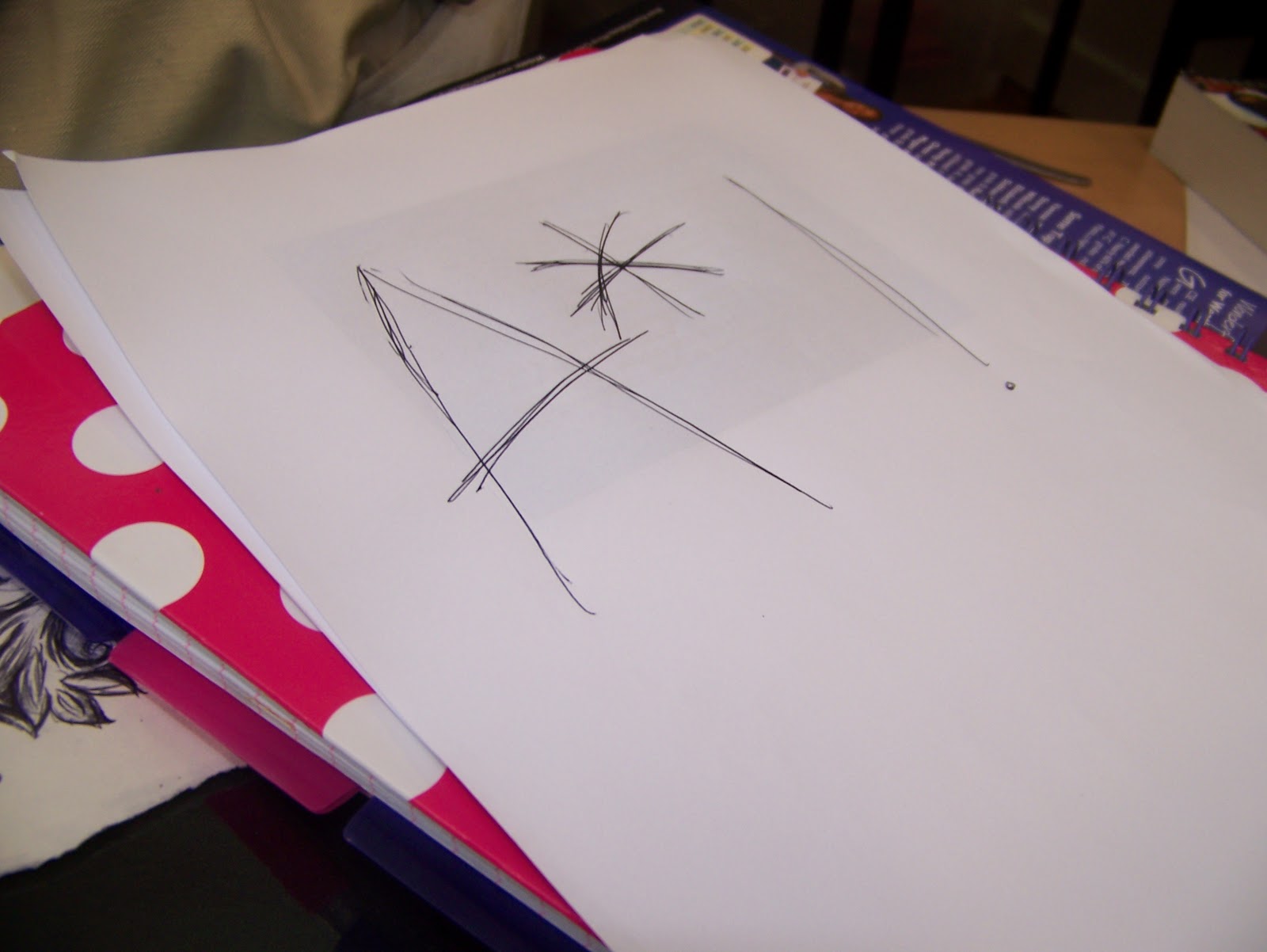
Links to coverline 'AIM HIGH - student gets straight A*'s in GCSE's'
Ideally, I would have taken a picture of an exam paper marked as A* level, however, none were available. I drew an A* sign on blank paper to connote the grades of this GCSE student, and just added it to a pile of things to connote working.
Manipulation - I cropped this image to focus more into the A* symbol. I also adjusted the contrast to give a 'cleaner' look to this photograph.
Rough Layouts
Front Cover Original Design
Title - Centred conveying school life (achieve- you achieve qualifications, awards etc in school).
Main image - medium close-up, connects to main coverline (main coverline anchors image). School in background, again points out the type of magazine this is.
Coverlines & Sublines - 1-3 words long, catchy, make the reader want to find out more e.g. 'Back to School - Evening classes proposed for parents'. Also contains a buzzword in the coverline 'EXCLUSIVE- life in the sixth form'. Makes out that this magazine has articles that no other magazine has. (For full list of all coverlines and sublines, see the planned coverline list above).
Puff - there's a competition to win a memory stick, advertised on the bottom left of the page - is a selling point.
Colour Ideas - I did not colour my plan, however I think I will use the colour purple for the title and coverlines, as it connects to the colour of the sixth form ID badge in the school. The sublines will be in black.
Contents Page Original Design
.JPG)
Two columns, one containing feature articles and the other regular articles & images relating to feature articles.
Images :
* School theatre with stage lighting on, which connects to the coverline 'HIT THE LIGHTS - professional lighting installed in the theatre'.
* Three sixth form students in their common room square, connects to coverline 'EXCLUSIVE - the real story of life in the sixth form'.
*GCSE exam paper, marked as an A*, connects to coverline 'AIM HIGH - student gets straight A*'s in GCSE's'.
There is also a small subscribe section on the bottom left of the page with information on how the reader can subscribe to the magazine.
Title - Centred conveying school life (achieve- you achieve qualifications, awards etc in school).
Main image - medium close-up, connects to main coverline (main coverline anchors image). School in background, again points out the type of magazine this is.
Coverlines & Sublines - 1-3 words long, catchy, make the reader want to find out more e.g. 'Back to School - Evening classes proposed for parents'. Also contains a buzzword in the coverline 'EXCLUSIVE- life in the sixth form'. Makes out that this magazine has articles that no other magazine has. (For full list of all coverlines and sublines, see the planned coverline list above).
Puff - there's a competition to win a memory stick, advertised on the bottom left of the page - is a selling point.
Colour Ideas - I did not colour my plan, however I think I will use the colour purple for the title and coverlines, as it connects to the colour of the sixth form ID badge in the school. The sublines will be in black.
Contents Page Original Design
Two columns, one containing feature articles and the other regular articles & images relating to feature articles.
Images :
* School theatre with stage lighting on, which connects to the coverline 'HIT THE LIGHTS - professional lighting installed in the theatre'.
* Three sixth form students in their common room square, connects to coverline 'EXCLUSIVE - the real story of life in the sixth form'.
*GCSE exam paper, marked as an A*, connects to coverline 'AIM HIGH - student gets straight A*'s in GCSE's'.
There is also a small subscribe section on the bottom left of the page with information on how the reader can subscribe to the magazine.
Plans
FRONT COVER
Title: Achieve
Details of mise-en-scene of main image: a medium close up of a sixth form student, relating to the main coverline ('High Flyer - year 13 student is accepted into Cambridge University'), background = outside main entrance or in school grounds.
Coverlines: 'AIM HIGH - student gets straight A*'s in GCSE's', 'HIGH FLYER - year 13 student accepted into Cambridge University', 'HIT THE LIGHTS - professional lighting is installed in the theatre', 'AMAZING!- year 10 student qualifies for the London 2012 Olympics', 'LONGER LUNCHTIME - plans to add an extra half hour', 'BACK TO SCHOOL - evening classes proposed for parents', 'AND THE WINNER IS... Teacher wins national award', 'EXCLUSIVE - the real story of life in the sixth form'.
CONTENT
REGULAR CONTENT:
- Letters - from students, teachers etc to the magazine making suggestions/ giving their views on a previous article/ giving views of the school etc.
- Holiday Update - News on inset days planned, half term etc.
- Special Events This Month.
- Rewards Update - What new things the students can buy from the IRIS rewards system.
- Exciting Opportunities - Whats on offer to students within and outside the school to earn extra credit/voluntary hours etc.
- Funny Times - funny stories of happenings in school by students and teachers.
- Helping Hand - an anonymous help page for students, provides counselling and advice from learning mentors/ school nurse / peer counselling.
FEATURES - see coverlines above.
IMAGES FOR CONTENT PAGE:
- picture of the theatre - showing off its new lighting.
- picture of the common room and happy looking group of sixth form students.
- picture of an A* graded GCSE paper.
Title: Achieve
Details of mise-en-scene of main image: a medium close up of a sixth form student, relating to the main coverline ('High Flyer - year 13 student is accepted into Cambridge University'), background = outside main entrance or in school grounds.
Coverlines: 'AIM HIGH - student gets straight A*'s in GCSE's', 'HIGH FLYER - year 13 student accepted into Cambridge University', 'HIT THE LIGHTS - professional lighting is installed in the theatre', 'AMAZING!- year 10 student qualifies for the London 2012 Olympics', 'LONGER LUNCHTIME - plans to add an extra half hour', 'BACK TO SCHOOL - evening classes proposed for parents', 'AND THE WINNER IS... Teacher wins national award', 'EXCLUSIVE - the real story of life in the sixth form'.
CONTENT
REGULAR CONTENT:
- Letters - from students, teachers etc to the magazine making suggestions/ giving their views on a previous article/ giving views of the school etc.
- Holiday Update - News on inset days planned, half term etc.
- Special Events This Month.
- Rewards Update - What new things the students can buy from the IRIS rewards system.
- Exciting Opportunities - Whats on offer to students within and outside the school to earn extra credit/voluntary hours etc.
- Funny Times - funny stories of happenings in school by students and teachers.
- Helping Hand - an anonymous help page for students, provides counselling and advice from learning mentors/ school nurse / peer counselling.
FEATURES - see coverlines above.
IMAGES FOR CONTENT PAGE:
- picture of the theatre - showing off its new lighting.
- picture of the common room and happy looking group of sixth form students.
- picture of an A* graded GCSE paper.
Introduction - Preliminary Exercise
Using DTP and an image manipulation programme, I will produce the front page of a new school/college magazine, featuring a photograph of a student in medium close-up, plus some appropriatly laid out text and masthead. Additionally, I will produce a mock-up of the layout of the contents page to demonstrate my grasp of DTP. All images and text will be original, and produced by myself.
Subscribe to:
Posts (Atom)